WITAN

Witan Exec · Render · Calc · Lint · Alternatives · Pricing · Agent Skills · Install Witan

---

# Spreadsheet mastery for your coding agent.

The fastest, most accurate way for agents to edit, render, calculate, and lint workbooks.

## Quick start

Paste this into your coding agent:

    Evaluate whether adding Witan would improve my spreadsheet
    workflow. Read https://www.witanlabs.com/agents to understand
    what it offers, explore my codebase to understand my current
    approach, and present pros and cons with a recommendation.

    If positive, make an implementation plan.

## Code mode for spreadsheets

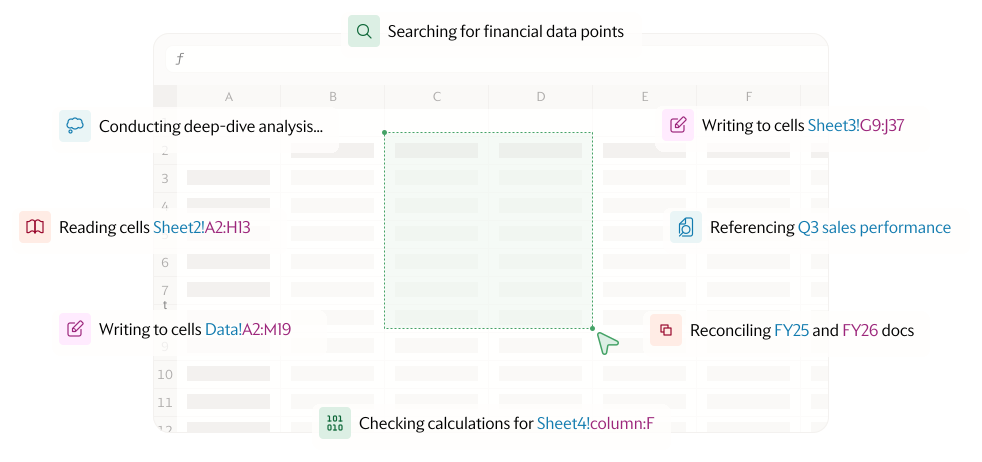
Your coding agent writes JavaScript, Witan executes it against the
workbook in a sandboxed runtime with 30+ purpose-built methods for
reading, writing, searching, and verifying spreadsheets.
Token-efficient by design, replace dozens of tool calls with a
single code execution.

→ Learn more about Exec

## Benchmark

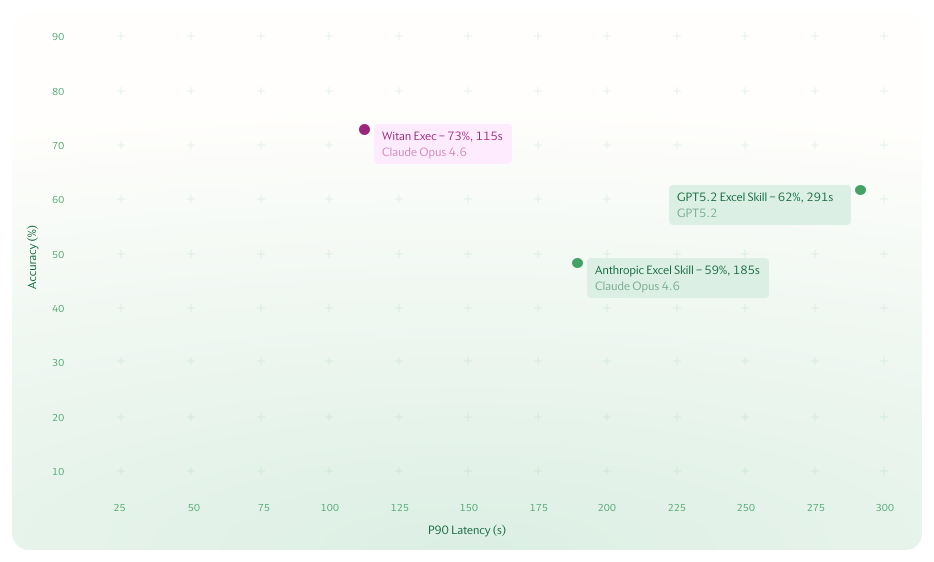
24% more accurate and 60% faster at the tail. The purpose-built
API surface means your agent doesn't have to figure out openpyxl's
quirks, and the .NET engine handles formula recalculation with full
Excel fidelity.

| Model | Accuracy | P90 Latency |
|---|---|---|
| Witan Exec with Claude Opus 4.6 | 73% | 115s |
| Anthropic Excel Skill | 59% | 185s |
| GPT5.3 Excel Skill | 62% | 291s |

Tested on a 250-question spreadsheet Q&A dataset, same workbooks.

## The engines powering Witan

One interface for all spreadsheet tasks. Four engines under the hood.

### The Edit Engine

A purpose-built edit library for browsing and modifying workbooks,
combining JavaScript with a .NET backend.

### witan xlsx render — The Rendering Engine

High-fidelity rendering of any cell range in your spreadsheet.
Targeted, auto-scaled for vision models, with built-in pixel diffing.
→ Read more

### witan xlsx calc — The Formula Engine

Full fidelity excel formula recalculation, with support for full,
incremental and iterative calculations.
→ Read more

### witan xlsx lint — The Linting Engine

ESLint for spreadsheets, with eleven rules that catch formula bugs
recalculation is not able to see.
→ Read more

## The Verify Loop

Alongside Witan Exec, we also offer access to the individual engine
tools. This means you can build more incrementally on-top of your
existing agent without sacrificing the value of a verification loop.

We give your agent eyes, a calculator, or a code reviewer.

1. Edit with your existing tools
   openpyxl, pandas, xlwings, whatever writes .xlsx files.

2. Render the affected region
   witan xlsx render report.xlsx -r "Sheet1!A1:Z50"
   Shows exactly what Excel would display. Diff against a baseline
   to see what changed.

3. Calc to verify formulas
   witan xlsx calc report.xlsx -r "Sheet1!B1:B20"
   Recalculates what changed and reports any new errors with
   explanations.

4. Lint for semantic bugs
   witan xlsx lint report.xlsx
   Catches logic errors that pass recalculation — double-counting,
   unsorted lookups, type coercion issues.

## Why Witan?

Accurate, lightweight, and purpose-built for coding agents.

### What Agent Sees Is What You Get (WASIWYG).

The rendering engine that serves your agent shows exactly what end
users will see when opening in excel. Every formatting detail your
users see, your agent sees too.

### Skip LibreOffice and headless browsers

The standard spreadsheet skill from Anthropic and OpenAI use
LibreOffice headless for rendering and recalculation — a 2GB install
that renders entire sheets as PDFs, diverges from Excel's actual
appearance, and provides no diffing capability. Witan renders targeted
cell ranges at high fidelity with zero local dependencies beyond the
CLI binary. Learn more here

### Token-efficient by design

Full-sheet screenshots waste vision model tokens on irrelevant cells.
witan xlsx render targets exactly the range you care about and
auto-scales resolution to stay under vision model limits. witan xlsx
calc returns structured text, not screenshots — cheaper to process
and easier to act on.

### Semantic linting saves debugging cycles

witan xlsx lint catches bugs that pass recalculation: overlapping SUM
ranges that double-count, VLOOKUPs on unsorted data, empty cells
silently coerced to zero, mixed percent and absolute values in
arithmetic.

### Plug and play

Compatible with any spreadsheet agent: Claude Code, Codex, or custom.
One binary, four commands. Install in one line and it's ready to use.

## Get started

    # Install
    curl -fsSL https://witanlabs.com/agents/install.sh | sh

    # Try it
    $ witan xlsx exec report.xlsx --expr 'await xlsx.readCell(wb, "Summary!A1")'

No signup or API key required. Just install and start using.

All install options →

## Frequently asked questions

### Why a CLI, not an MCP server?

Coding agents run in sandboxes with a shell and a filesystem. A CLI is
the most direct integration: `witan xlsx exec report.xlsx --code '...'`
reads and writes files on disk, returns structured JSON to stdout. No
server to configure, no protocol adapter, no base64-encoding
multi-megabyte workbooks through a message protocol.

### Why one `exec` command instead of many?

Search, table detection, dependency tracing, formula evaluation, and
30+ other operations are methods inside exec's JavaScript runtime — not
separate CLI commands. One tool call, one round-trip. The agent writes a
script that chains whatever operations it needs in a single execution.
The four CLI commands are `exec`, `render`, `calc`, and `lint`.
Everything else lives inside exec.

### Why JavaScript?

LLMs write JavaScript more reliably than any other language. The runtime
is sandboxed — no filesystem access, no network, no imports — backed by
a .NET engine for xlsx/xml fidelity.

### Supported file formats

.xlsx (Office Open XML), .xls (Excel 97-2003), and .xlsm
(macro-enabled). Macros are preserved in the file but not executed.

## How we built Witan

We spent four months building and testing approaches to this problem — from SQLite knowledge representations to multi-agent architectures to the REPL-based approach that became Witan Exec. The engineering journey, including benchmark results, failed experiments, and the lessons that shaped the product, is documented in our research log.

---

© Witan Labs Inc. 2026
hello@witanlabs.com · API Docs · GitHub · Research · Terms · Privacy